HTTP POST is the most widely used and recommended method for sending lead data to an endpoint. It places information in the request body rather than in the URL. POST is an HTTP method used to send data to a server so the server can create or process a new record. POST is an HTTP method used to send data to a server so the server can create or process a new record. This helps protect personal data from appearing in logs or browser history and supports structured JSON or XML payloads. When delivered over HTTPS, POST provides an encrypted and reliable method for transferring leads in real time.
What HTTP POST Does for Lead Delivery
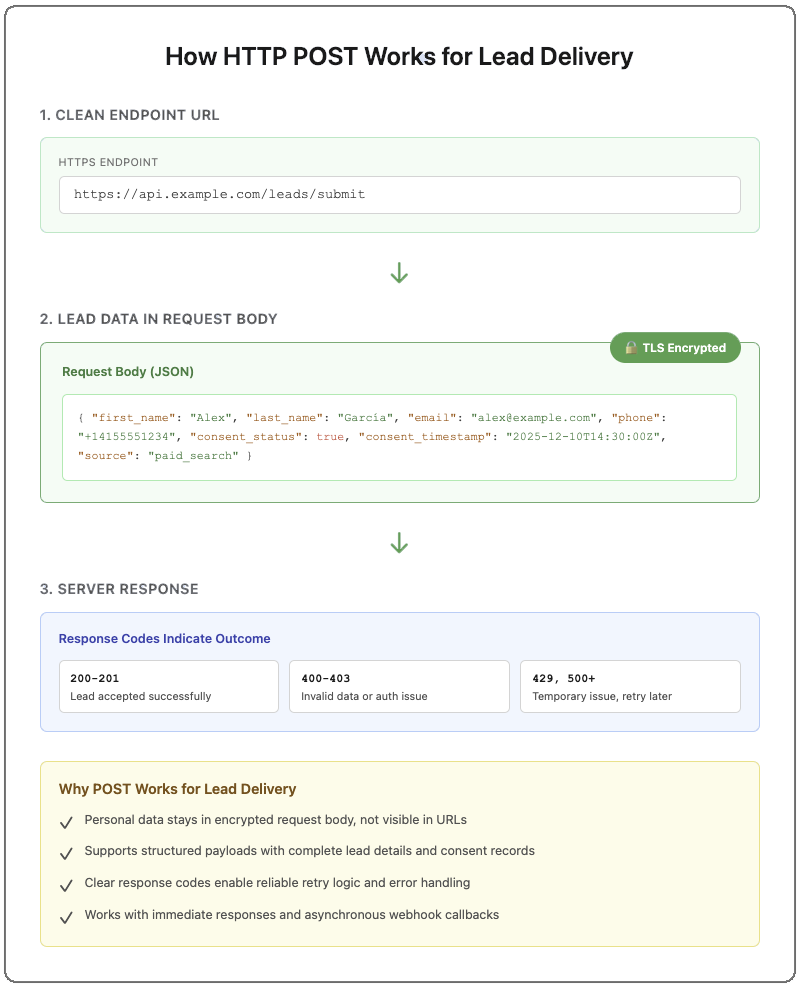
POST sends lead data in the request body, which is the part of an HTTP request used to submit information to a server. This structure works well for lead delivery because it supports complete payloads, including contact details, consent records, and attribution fields. When sent via HTTPS, the request body is encrypted and kept out of URLs, referrer headers, and most standard access logs, which reduces the chance of exposing personal information.
In our experience working with lead-delivery pipelines, POST is effective because it supports immediate acknowledgements, such as HTTP 200 or 201, as well as asynchronous patterns like webhook callbacks. These behaviors make it easier for downstream systems to process and route leads as they arrive.
How POST Differs from GET for Lead Submission
GET is an HTTP method used to retrieve information, and any data sent with a GET request appears in the URL as query parameters. This creates exposure in places like server logs, browser history, and referrer headers. Because lead data often includes personal information, GET is not recommended for transmitting sensitive fields.
POST places data in the request body instead of the URL. This allows for larger and more structured payloads and keeps sensitive information out of locations where it might be recorded. In practice, teams that handle lead data choose POST because it avoids these operational risks and provides a more appropriate pattern for submitting new records.
While HTTPS encrypts both the URL path and the request body in transit, POST remains the safer option due to how systems log and handle URLs.
Configuring POST for CRM Integrations
A POST-based CRM integration works best when both systems share a clear understanding of how data should be exchanged. This includes the endpoint that receives the lead, the authentication method, the content format, and the expected response codes. Defining these elements up front helps ensure predictable behavior between systems.
CRMs also expect lead data to follow stable structures. Shared schemas or mapping references help ensure that fields such as names, timestamps, phone numbers, and consent details arrive in formats the CRM can interpret. These conventions reduce onboarding complexity and prevent data quality issues.
Clear responses from the receiving system make it easier to distinguish temporary issues from data errors. This separation supports accurate delivery without introducing duplicates or losing leads.
Components of a POST Lead Request
A POST lead request consists of four main elements: the endpoint URL, the headers, the request body, and the response code. The endpoint is the HTTPS address that receives the lead. Headers specify the content format, such as JSON, and contain authentication details that confirm the sender’s identity.
The request body holds the lead data itself. This often includes contact information, consent details, timestamps, and identifiers that help systems track or reconcile the record later.
When the receiving system processes the request, it returns a response code. This is a three-digit number that indicates the outcome.
200-level codes confirm acceptance
400-level codes indicate client-side issues, ie: invalid data or authentication/authorization failures
429 and 500-level codes signal temporary issues that may allow a retry
These components create a predictable structure for sending and interpreting lead data across systems.
Field Mapping for CRM API Integration
Field mapping ensures that incoming lead data matches the field names and formats expected by the receiving CRM. This helps the CRM interpret each value correctly, whether it is a name, a timestamp, a phone number, or a consent record.
Shared schemas or mapping references make these expectations clear across systems. When both sides follow the same structure, leads can be stored and routed without misalignment or data loss.
Consistent mapping also supports downstream processes such as scoring, reporting, and auditing, since each field retains its intended meaning as it moves through different systems.
Operational Practices for Reliable POST Delivery
Reliable lead delivery depends on visibility into how the system performs. Monitoring metrics such as delivery success rate, latency, and error patterns helps teams detect issues early, especially during periods of high volume. These signals show when performance begins to shift and allow teams to intervene before leads are delayed or lost.
Alerts tied to these metrics help ensure that problems are surfaced quickly rather than discovered after the fact. This operational awareness supports the stability of POST-based delivery and helps maintain consistent lead flow between systems.
Handling Errors with Safe Retries
Lead delivery involves a sending system and a receiving system, and at times, the receiver may not be available to process a request. In these situations, the sender may retry the request once conditions improve.
Retries are safe when each request includes a stable identifier, such as a UUID or idempotency key, and the receiving system enforces idempotency based on the identifier. A UUID is a unique, randomly generated identifier that helps the receiving system recognize repeated attempts and avoid creating duplicate records.
Not all errors should lead to retries. Issues related to missing fields, invalid data, or authentication must be corrected before a lead can be accepted. Clear responses from the receiving system help distinguish between temporary conditions and errors that require changes to the data.
This separation supports predictable delivery and reduces the chance of losing leads or creating conflicting records.
Configuring Webhooks for Real-Time Lead Flow
Webhooks provide real-time delivery by sending POST requests to a specified endpoint whenever a new lead is ready. A simple verification process during setup helps ensure that requests are sent to the correct destination, and payload signatures allow the receiving system to confirm that the request came from a trusted source.
Webhooks also benefit from controls that prevent overload, such as rate limits or concurrency limits. These safeguards help maintain steady delivery when volume increases. Predictable retry behavior further supports stability when the receiving system is temporarily unavailable.
Tracking information such as request identifiers and timestamps makes it easier to follow a lead through the delivery path and understand how the receiving system responded. This visibility helps teams diagnose issues quickly and maintain confidence in the delivery process.
Security and Compliance for POST Lead Transfers
POST lead delivery often involves personal information, which brings it under regulations such as CCPA/CPRA, TCPA, and CAN-SPAM. These laws require organizations to protect personal data, maintain accurate consent records for certain types of outreach, and honor communication preferences.
POST requests that carry personal information should always be sent over HTTPS with TLS encryption. TLS, or Transport Layer Security, encrypts data during transit and makes the contents of a request unreadable to anyone except the intended recipient. Access to lead data should also be restricted through secure API credentials, role-based permissions, and audit logs that show when data was received and how it was accessed.
Many organizations include consent status, timestamps, and the text shown to the user in the POST payload. These details help demonstrate lawful outreach under TCPA and CAN-SPAM and support the documentation expectations strengthened under CPRA.
Clear retention rules limit how long personal data and consent records are stored. Keeping only what is needed reduces risk and supports audit readiness as regulations evolve.
How LeadExec Uses POST for Lead Delivery
LeadExec has supported real-time lead delivery since 2007, and over that time we have built and maintained many POST-based integrations with CRMs, buyer systems, and custom endpoints. Because POST provides a consistent structure for sending complete lead data, it has remained the core method we rely on for reliable delivery across different systems.
In LeadExec, you configure the endpoint, authentication, and payload structure through webhook templates. We handle the delivery, record the responses we receive, and keep a clear log of each attempt so you can see what was sent and how the receiving system responded.
By managing these details in the background, we make a complex process easier to handle. You can focus on capturing and routing leads while LeadExec manages the delivery.
Advanced Strategies Beyond Basic POST
Some lead-delivery workflows use additional patterns alongside POST to support more complex routing or higher volumes. Approaches such as ping-post, scoring layers, or message queues can provide features that extend beyond a simple request-and-response model.
These patterns do not replace POST. They build on it and help support specialized requirements when needed.
Ping-Post Compared with HTTP POST
Ping-post sends a brief preview of a lead so the receiving system can decide whether to accept it before receiving the full record. A standard POST delivers the complete lead in a single request. Ping-post is often used in routing or bidding models. For a detailed breakdown of how ping-post works, see:
Many lead-delivery pipelines include a validation or scoring step before the POST request is made. Validation confirms that required fields, consent details, and basic formatting are present, and scoring helps classify leads based on business rules or quality indicators. These steps prepare the lead for delivery but remain separate from the POST request itself.
Scaling Lead Delivery Architecture
High-volume lead delivery often relies on queues or other asynchronous tools to handle traffic spikes and maintain steady performance when receiving systems are slow or unavailable. These components work alongside POST and help keep leads moving reliably as volume increases.
HTTP POST offers a dependable way to deliver complete lead data in real time. It supports structured payloads, protects personal information during transfer, and works consistently across CRMs, buyer platforms, and custom endpoints. When delivery rules are clearly defined and performance is monitored, POST provides a stable foundation for moving leads through modern lead-delivery workflows.
Perspective from Practice
This article is informed by operating lead-delivery pipelines where reliability, data integrity, and auditability matter at scale. As lead volumes increase and integrations span CRMs, buyer systems, and custom endpoints, delivery failures tend to surface in predictable ways: exposed data in logs, silent drops caused by schema drift, and retries that create duplicates instead of recovery.
At ClickPoint Software, we see these patterns daily across customers managing real-time lead flows with compliance and uptime requirements.
LeadExec is a lead capture, qualification, and distribution platform built around POST-based delivery because it provides the structure needed to move complete lead records safely and predictably. By standardizing payloads, enforcing HTTPS delivery, tracking response codes, and retaining delivery logs tied to each transaction, teams gain visibility into what was sent, when it was accepted, and how failures were handled. This reduces guesswork during troubleshooting, prevents duplicate creation during retries, and supports the documentation requirements that accompany regulated lead programs.
FAQ
Why is POST preferred for lead delivery?
POST places lead data in the request body instead of the URL, which helps protect personal information from appearing in logs or browser history. It also supports larger and more structured payloads than GET.
What is the request body?
The request body is the part of an HTTP request that carries submitted data. For lead delivery, this is where JSON or XML payloads are sent.
What does HTTPS with TLS encryption do?
HTTPS uses TLS (Transport Layer Security) to encrypt data during transit. This keeps the contents of a POST request unreadable to anyone except the intended recipient.
What is a UUID?
A UUID is a unique, randomly generated identifier that helps receiving systems recognize repeated delivery attempts and avoid creating duplicate records.
How do response codes help with delivery?
Response codes indicate the outcome of a POST request.
200-level codes confirm acceptance
400-level codes indicate invalid data or authentication issues
429 or 500-level codes signal temporary issues that may allow a retry
Why does POST support real-time routing?
POST allows systems to send complete lead data immediately and receive a direct response. This makes it suitable for real-time workflows and webhook-based delivery.
Does LeadExec use POST?
Yes. LeadExec has relied on HTTP POST for lead delivery since 2007. The platform uses POST to deliver structured lead data, record responses, and provide clear delivery logs.
Anders is the Chief Marketing Officer at ClickPoint Software. Anders has deep knowledge of lead gen, lead distribution, lead management and marketing regulations across verticals. His experience with interactive web marketing, content marketing, SEO, and SEM, has been bolstered by being at the leading edge of LLMO and GEO insights.


.png?width=384&name=image%20(1).png)